The problem
mentat is a harness that runs a software development workflow through
four coordinated agents — Orchestrator, Architect, Developer, and Staff — instead of a single
chat session. The workflow has hard gates that a human has to open: the Architect authors an
ADR and waits for an APPROVED before the Developer writes a line of code, and
individual agents ask for permission whenever they want to run something outside their lane.
Those are the moments that matter, and they are also the moments that don't arrive on a
schedule. An /architect RTD-541 run can take a few minutes of reading and
reasoning before the ADR lands on the approval gate. A /developer session can
sit for a while and then fire off three permission prompts in a row. If I'm tied to the
terminal the whole time, the "let it run in the background" part of the workflow stops being
true.
What I wanted was a way to walk away from the machine and still answer the moments that need a human — from the app I already keep open all day.
What it does
The bridge is an opencode plugin, and its whole job is to mirror the small set of things
worth a human's attention into Slack while staying quiet about everything else. When a
session starts, it posts a root message and reacts with an :hourglass_flowing_sand:
— the in-progress loader. When the session goes idle or finishes, the loader is swapped for a
:white_check_mark:. New activity after idle swaps it back, so the reaction on a
thread is a reliable "is this still running" signal at a glance.
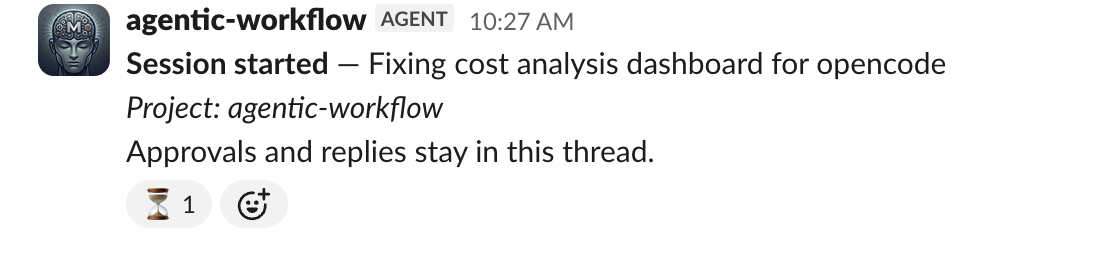
A new session posts its root message to the channel; the hourglass reaction is the bridge's "working" signal.
When an agent hits a permission gate, the bridge posts an approval card into that session's
thread — Approve once, Always, or Reject —
with a compact, redacted context summary so I can judge the request without opening the
terminal. The agent's question tool works the same way: each option becomes a
button, and a Submit answers action sends the whole set back.
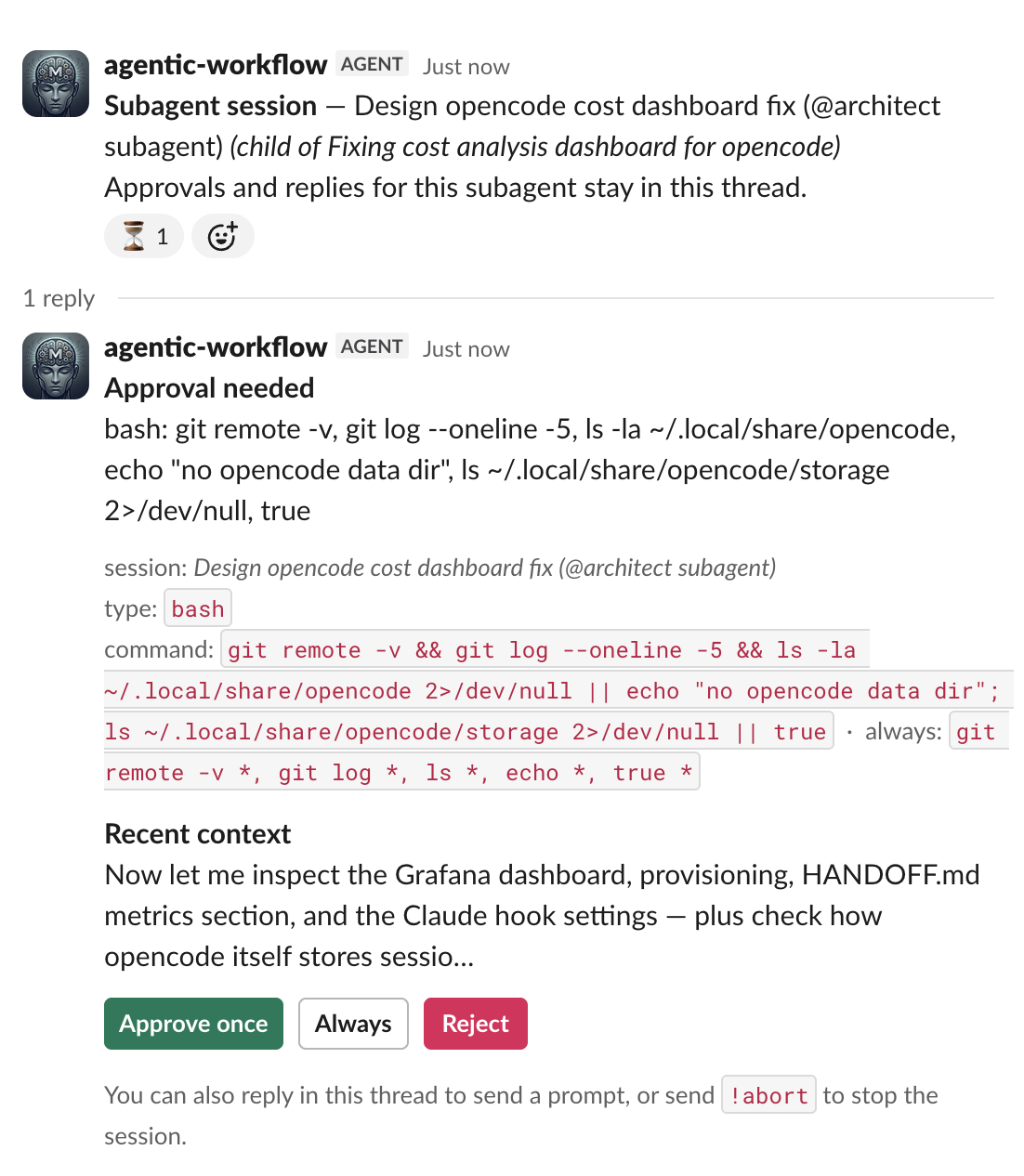
An approval card: three buttons, a one-line summary of what's being asked for, and a redacted snippet of recent context.
Thread replies are two-way. Replying to a thread injects that text into the running session
as a prompt, and typing !abort stops the session. There's also a /s
slash command that returns an ephemeral status — the session title, whether an approval or
question is pending, and the last few activity lines. (/status is reserved by
Slack, so the command is registered as /s.)
Crucially, routine progress is not mirrored. Tool runs, plan updates, completion summaries, and errors stay in the local opencode log. The only proactive messages are approval and question cards. Slack sees the questions, not the machinery.
How it's wired
The bridge uses Slack's Socket Mode for inbound events and the Web API for
posting. Socket Mode is the detail that makes this pleasant to run: it keeps a WebSocket open
to Slack instead of waiting for HTTP requests, which means no public URL, no ngrok, and no
tunnel. The plugin registers two clients — a WebClient for messages and
reactions, and a SocketModeClient for block_actions,
event_callback, and slash_commands.
On the opencode side, the plugin subscribes to session and interaction events and maps them
onto Slack. Configuration is read from the project's .env (the plugin loads it
itself, so the SLACK_* values don't need exporting):
SLACK_BOT_TOKEN=xoxb-...
SLACK_APP_TOKEN=xapp-...
SLACK_CHANNEL=C0123ABC456
SLACK_ALLOWED_USERS=U123, U456
SLACK_BRIDGE=on          # set to `off` to disable without removing tokens
If the config is incomplete, the plugin logs once and stays inert, so opencode always starts
regardless. State — the mapping from session ID to Slack thread — is kept in a small JSON
file under .opencode/.
The event flow
The interesting behaviour is a set of small, idempotent handlers over opencode events:
| opencode event | What the bridge does |
|---|---|
session.created | Posts the root message, creates the thread, applies the loader reaction. |
permission.asked | Posts the approval card; registers the pending permission for the button handler. |
question.asked | Posts the question card with option buttons. |
session.idle | Swaps the loader reaction for the done check mark. |
session.deleted | Marks the thread done and resolves any orphaned approval or question cards. |
Two cases get special treatment. Child sessions (subagents) are created lazily — their thread
is only opened when they actually need something from a human, and a one-line pointer is
dropped into the parent thread so you can find it. And reactions are applied idempotently:
Slack's already_reacted / no_reaction errors are tolerated as
success, and a swap always removes the previous emoji before adding the next, so a busy →
done → busy cycle never stacks two reactions on the root message.
Keeping it safe
A bridge that can approve agent actions from a chat channel needs to be careful about a few things, so the plugin errs on the side of doing less:
- Redaction. Everything posted goes through a redaction pass that strips
absolute paths, hostnames, and usernames — replaced with a
[path]placeholder. The project name is shown as the working directory's basename, nothing more. Errors are never posted to Slack at all. - Authorisation. Only users in
SLACK_ALLOWED_USERScan click buttons, reply, or run/s. If that list is empty, the plugin logs a warning — anyone in the channel can then answer approvals. - No replayed clicks. A button value is only honoured if the bridge itself registered that permission ID for that session. A stale or replayed click on an already-resolved permission is logged and ignored.
- Dead sessions. A transient failure (network blip, 5xx) leaves the card live for a retry; only a definitive 4xx from opencode discards the pending approval.
All of it is best-effort by design — a failed reaction or logging call never breaks the agent, and a broken bridge can't wedge a session.
Setup
The bridge ships as an npm package, so the first step is one line in your project's
opencode.json:
{ "plugin": ["opencode-slack-bridge"] }
opencode installs and loads it on the next start — nothing else to wire up. Then stand up a
Slack app with Socket Mode enabled and fill in the env from the previous section. The scopes
are chat:write, channels:read, channels:history (or
groups:history for private channels), users:read,
reactions:write, and commands. Turn on interactivity for the
approval buttons, register the /s command, invite the app to a channel, and
copy the channel ID into SLACK_CHANNEL.
The demo
Here's the whole loop, live — a session starting in the terminal, the loader reaction appearing in Slack, an approval arriving, and the answer flowing back to the running agent:
Terminal on one side, Slack on the other: the approval answered from Slack resumes the session in the terminal.
The nice part is how little there is to remember. Walk away, glance at a thread's reaction to see whether it's still working, tap Approve once when asked, and come back when the check mark appears. The terminal stays the source of truth; Slack just becomes the doorbell.
The bridge lives in the mentat repository,
under packages/slack-bridge/, and is published on npm as
opencode-slack-bridge.
Update: it shipped. The bridge is now an installable opencode plugin — grab it from
npm and add
"plugin": ["opencode-slack-bridge"] to your project's opencode.json
instead of copying any files into your project. Releases are automatic: conventional commits
to the package bump the version, publish, and tag in one workflow run.